 It's free, continue with Google
Why is my WordPress site so slow? Causes, tests and fixes
Most slow WordPress sites share four causes: a slow server, oversized images, too many plugin and marketing scripts, and no caching. Here is how to test yours in 20 minutes and who should fix each cause.
 By
By The short answer
Why is my WordPress site so slow? In most cases the server takes too long to send the first byte, the biggest image on the page is several times larger than it needs to be, and plugins and marketing tags load JavaScript on every page whether it is needed or not. It is rarely WordPress itself. The platform is the same everywhere, yet only 45% of WordPress sites pass Google's Core Web Vitals on mobile (HTTP Archive Web Almanac 2025, CMS chapter), which tells you the difference lies in how each site is built and hosted.
This guide is for marketing managers who own a WordPress site but do not write code. It explains what "slow" means in numbers, how to test it yourself in about 20 minutes, what usually causes it, and who should fix each cause.
How slow is too slow for a WordPress site?
A WordPress site is too slow when its main content takes longer than 2.5 seconds to appear, when it takes longer than 200 milliseconds to respond to a tap, or when the layout jumps around as it loads. Those are Google's Core Web Vitals thresholds, measured at the 75th percentile of real visits on mobile and desktop.
Google publishes the thresholds on web.dev and recommends judging a page by the experience of the 75th percentile of visits. In plain words: three in four visitors must get a good experience, not just the ones on fast office Wi-Fi.
| Metric | What it measures | Good | Poor | What the visitor notices |
|---|---|---|---|---|
| Largest Contentful Paint (LCP) | When the main content, usually the hero image or headline, appears | 2.5 s or less | Over 4 s | A blank or half-built page |
| Interaction to Next Paint (INP) | How fast the page responds to a tap or click | 200 ms or less | Over 500 ms | Buttons and menus that feel stuck |
| Cumulative Layout Shift (CLS) | How much the layout moves while loading | 0.1 or less | Over 0.25 | Tapping the wrong thing as content jumps |
Source: web.dev, Web Vitals and web.dev, CLS, checked 30 September 2026
Google is clear that this matters for search as well as for visitors.
We highly recommend site owners achieve good Core Web Vitals for success with Search and to ensure a great user experience generally.
That statement is on Google's Core Web Vitals documentation. Google also says page experience "aligns with what our core ranking systems seek to reward". It is one signal among many. A slow page with the best answer can still rank. A slow page with an average answer usually loses to a fast one.
How do WordPress sites compare with other platforms?
WordPress sites pass Core Web Vitals less often than sites on most hosted builders. In the Web Almanac 2025, 45% of WordPress sites passed on mobile, against 74% on Wix and 85% on Duda. The main reason is control: hosted builders choose the server, the caching and the code, while WordPress leaves every one of those choices to the site owner.
Source: HTTP Archive Web Almanac 2025, CMS and Performance chapters
Three things in the same dataset are worth knowing before you blame the platform.
- WordPress is everywhere, so its average includes everything. It runs 40.2% of all websites and 58.7% of sites with a known CMS (W3Techs, September 2026). Its average includes hobby blogs on budget shared hosting and enterprise sites on managed platforms.
- Weight is not the problem. The median mobile WordPress page weighs 2,894 KB, among the lightest of the platforms the Web Almanac measured. Squarespace pages are heavier at 3,974 KB. What slows WordPress sites is usually when things load and how long the server takes, not how many kilobytes there are.
- Lab scores lag too. WordPress records a median mobile Lighthouse performance score of 41, behind Wix at 64 and Webflow at 58 (Web Almanac 2025, CMS chapter). The Almanac's authors say lab scores are context, not a proxy for real visitors. Treat them the same way.
The honest read: WordPress can be as fast as anything else. A well-built WordPress site on good hosting passes comfortably. The platform just does not stop you building a slow one.
What does a slow WordPress site cost in enquiries?
A slow site costs enquiries because some visitors leave before the page is usable, and the ones who stay convert less. Studies consistently find that faster pages convert better, although the size of the effect depends on the site. Speed is a multiplier on the traffic you already pay for.
Read those with their limits. The Deloitte study was commissioned by Google, covered 37 European and US brands, and is six years old. It also found an 8.3% improvement in bounce rate for lead generation sites. Portent's analysis covered 100 million page views, but on only 20 websites. Neither promises that your site will convert 8% or 3x better. Both point the same way.
A worked example: what a small conversion change is worth
Here is the arithmetic for an illustrative Australian professional services site. The figures are invented to show the method; use your own.
- 4,000 visits a month, converting at 1.5%, gives 60 enquiries.
- If 20% of enquiries become clients worth AUD 3,000 each, that is 12 clients and AUD 36,000 a month.
- Every 0.1 percentage point of conversion rate is 4 enquiries, or 0.8 clients, or about AUD 2,400 a month.
So if speed fixes moved conversion from 1.5% to 1.7%, the modelled value is roughly AUD 4,800 a month of new-client revenue on these inputs. It is a scenario, not a forecast, and nothing guarantees that movement. The point is that a 0.2 point change on a site with steady traffic is worth more than most monthly hosting bills, which is why a cheap host can be the most expensive line in the marketing budget. For the wider list of conversion fixes and where speed ranks among them, see how to increase your website conversion rate.
What are the most common causes of a slow WordPress site?
The most common causes of a slow WordPress site are slow hosting, no page caching, oversized images, and too many scripts loaded by plugins, page builders and marketing tags. Most slow sites have two or three of these at once. The table shows how to spot each one without a developer, and who normally fixes it.
| Cause | How to spot it | Fix | Who fixes it |
|---|---|---|---|
| Slow hosting or server | PageSpeed Insights shows Time to First Byte over 0.8 s; the page stays blank before anything appears | Move to better hosting, or a data centre nearer your buyers | Host, developer |
| No page caching | Every visit is equally slow; TTFB stays high on repeat tests | Turn on server or plugin page caching and test logged out | Host, developer |
| Oversized images | The LCP element is an image; PageSpeed flags "properly size images" or "next-gen formats" | Resize and compress images, serve WebP or AVIF, do not lazy-load the hero | Marketing team, developer |
| Plugin scripts on every page | PageSpeed flags "reduce unused JavaScript"; many plugin names appear in the script list | Remove unused plugins; load the rest only where needed | Developer |
| Page builder bloat | Pages built with a visual builder carry deep nesting and several CSS files | Simplify layouts; rebuild key templates in the block editor | Developer |
| Third-party tags | Chat widgets, heatmaps, ad pixels and video embeds in the script list | Remove what nobody uses; delay the rest until after load | Marketing team, developer |
| Heavy sliders and video heroes | The LCP element is a slider or background video | Replace with one static image and a clear headline | Marketing team, developer |
| Outdated PHP or WordPress | Tools > Site Health reports an outdated PHP version | Update PHP and WordPress on a staging copy first | Host, developer |
| Database bloat | The admin dashboard is slow even when the public site is not | Clean revisions, expired transients and old plugin tables | Developer |
Source: PostCliq analysis, drawing on the Web Almanac 2025 Performance chapter and WordPress Site Health documentation
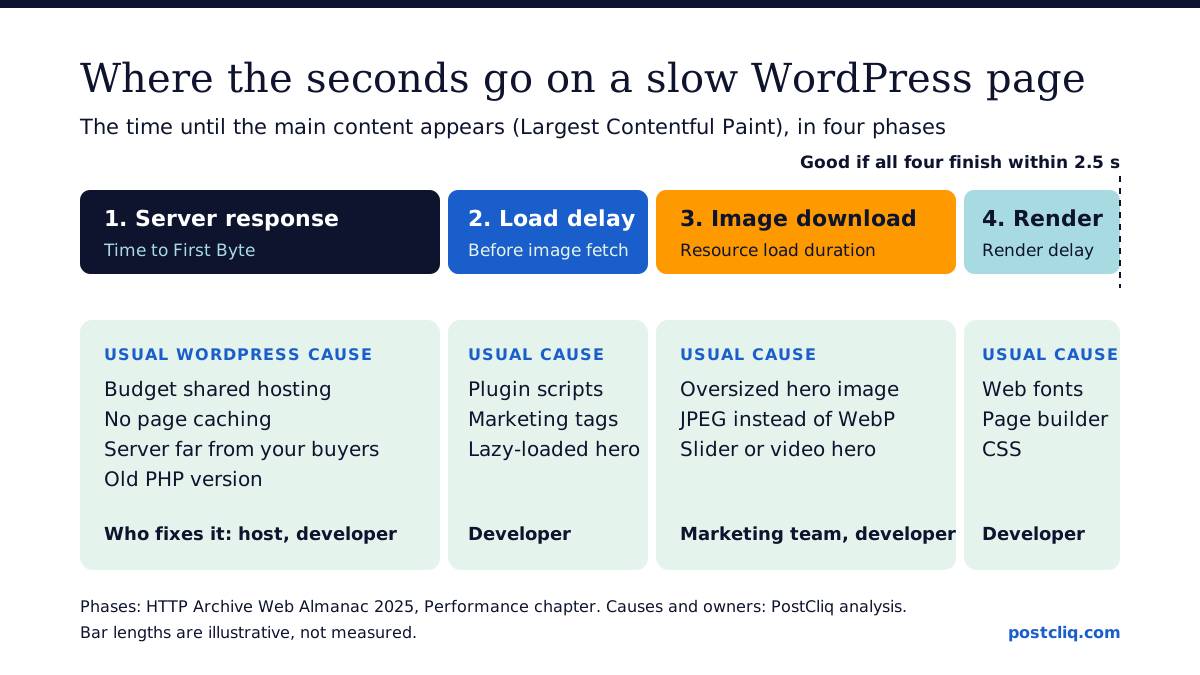
The Web Almanac breaks Largest Contentful Paint into four phases: the time to the first byte from the server, the delay before the browser starts fetching the main image, the time spent downloading it, and any delay before it is drawn. Each phase has a typical WordPress culprit, and knowing which phase is slow tells you who to call.
Hosting and server response
Server response is where many WordPress sites lose their first second. Only 44% of mobile websites have a good Time to First Byte of under 0.8 seconds (Web Almanac 2025). Budget shared hosting, no caching and a slow database all show up here, before a single image has loaded.
There is an Australian angle. If your buyers are in Sydney and your server is in the United States, every request crosses the Pacific. A content delivery network or a local data centre removes most of that distance. Ask your host where the site is served from.
Images
The largest image on the page is usually the Largest Contentful Paint element. A 3,000-pixel photo straight from a camera, shown in a 1,200-pixel slot, is the classic mistake. Resize images before uploading, use WebP or AVIF where your setup supports it, and make sure the hero image is not lazy-loaded, because that delays the one image that matters most.
Plugins, page builders and tags
This is the cause marketing teams add without noticing. Each plugin, chat widget, heatmap tool and ad pixel can add JavaScript that loads on every page. Page builders are common: Elementor alone is used on 31.5% of WordPress sites (W3Techs). A builder is not a problem in itself. A builder page with six nested sections, three sliders and four font families is.
JavaScript mostly hurts responsiveness (INP), and it can also hold up rendering. That matters because LCP is the hardest vital to pass: only 62% of mobile sites have a good LCP (Web Almanac 2025).
How do you test WordPress speed yourself?
You can test WordPress speed yourself in about 20 minutes with free tools. Run your key pages through PageSpeed Insights on mobile, check the Core Web Vitals report in Google Search Console, and open Tools > Site Health in the WordPress dashboard. Test the pages that carry enquiries, not just the homepage.
- Pick five pages. The homepage, your top two landing pages, a service page and the contact page. Home pages pass less often than inner pages: 45% of mobile home pages have good Core Web Vitals, against 56% of secondary pages (Web Almanac 2025). Your landing pages may differ from your homepage in either direction.
- Run each through PageSpeed Insights on mobile. Read the top panel first. "Discover what your real users are experiencing" is field data from Chrome users. The score underneath is a single lab test.
- Open Search Console's Core Web Vitals report. It groups similar URLs and shows which templates fail, which saves testing every page.
- Check Site Health. In the dashboard, go to Tools > Site Health. It flags an outdated PHP version, plugins waiting to be updated and other critical issues (WordPress documentation).
- Test logged out. Most page caching is skipped for logged-in users, so use a private browser window or you will measure a slower site than your visitors see.
- Write down the LCP element. PageSpeed names it. If it is an image, you know where to start.
Lab data versus field data
Field data is what real visitors experienced over the last 28 days, collected by Chrome. Lab data is one simulated load on a throttled phone. Field data decides whether you pass Core Web Vitals. Lab data explains why. If a page has no field data, its traffic is too low for Chrome to report, and the lab test is all you have.
How do you fix a slow WordPress site, in order?
Fix a slow WordPress site in order of effort and impact: turn on page caching, compress and resize images, remove unused plugins and tags, then address hosting and PHP, and only then consider rebuilding templates. The first three are cheap and often fix most of the problem. Test after each change so you know what worked.
- Caching. Ask your host whether server-level page caching is on. If not, one well-supported caching plugin, configured once, is usually enough.
- Images. Resize and compress the hero and above-the-fold images on your top pages. This is work a marketing coordinator can do.
- Plugins and tags. List every plugin and every third-party tag. Remove anything nobody can name a current use for. Old A/B testing snippets and abandoned chat tools are common finds.
- Hosting and PHP. If Time to First Byte is still slow after caching, the host is the constraint. Moving host is a real project; weigh it against the value arithmetic above.
- Theme and templates. If a heavy theme or builder is the root cause, rebuild the templates that carry enquiries first, not the whole site.
Do too many plugins slow WordPress down?
Plugin count matters less than what each plugin does on the front end. One plugin that loads a large script on every page can cost more than twenty that only run in the admin. Judge a plugin by what it adds to your public pages, and remove anything unused, because every inactive or abandoned plugin is also a security risk.
Should you buy a speed plugin?
A speed plugin can help when caching or image handling is missing. It cannot fix slow hosting, a bloated theme or a dozen marketing tags. Treat it as one tool, not the fix.
Who should fix it: you, your developer or your host?
The marketing team can fix images, remove unused tags and test pages. A developer should handle scripts, plugins, themes and caching configuration. The host owns the server, PHP version and data centre location. Most delays come from nobody owning the problem, so give each cause a named owner and a date.
A short brief helps. The website fix brief template turns a finding into a ticket a developer can price. If you need hands-on help, WP Creative, an Australian website growth agency that builds and looks after WordPress sites, does this work; WP Creative reports more than 10 years in business and more than 1,200 websites delivered.
How PostCliq checks this. PostCliq reads up to 50 of your public pages the way a careful visitor would. On speed it combines Lighthouse lab tests with Chrome UX Report field data, and ranks findings by the pages that carry enquiries. It never logs in and never installs a plugin, so it cannot see your plugin list or your server settings. See the WordPress audit page for exactly what the public check covers today, and the methodology for how findings are ranked.
Is speed the only thing slowing your enquiries?
Speed is the most visible WordPress problem, but rarely the only one. Broken forms, form notifications that land in spam, out-of-date plugins and pages hidden from search cost enquiries too, often silently. Check those at the same time, because a fast page with a broken form still produces nothing.
Security is the second big one. Patchstack counted 11,334 new WordPress ecosystem vulnerabilities in 2025, 91% of them in plugins. Patchstack sells security software, so read that as a vendor count, but the direction is not in dispute. The full list, with the business cost of each, is in common WordPress problems that quietly cost enquiries. For a structured pass over speed, security, search access, forms and tracking, use the WordPress audit checklist for marketing teams.
What to do next
- Run your five most important pages through PageSpeed Insights on mobile today, logged out, and record LCP, INP and CLS from the field data.
- Open Tools > Site Health and screenshot any critical issues for your developer.
- Compress the hero image on your main landing page and remove one third-party tag nobody uses. Re-test.
- Work through the one-hour website check to catch the non-speed problems at the same time.
- Run a free PostCliq audit to see speed, forms, search access and trust findings ranked across up to 50 public pages, with three quick wins to make first.
- Read why clicks do not become enquiries for the problems speed alone will not fix, or browse every guide on WordPress performance.
Frequently asked questions
Why is my WordPress site suddenly so slow?
A sudden slowdown usually follows a change: a plugin or theme update, a new marketing tag, a traffic spike, or a problem at your host. Check what changed in the last week first. Deactivate recent plugins one at a time on a staging copy, ask your host about server load, and compare Time to First Byte with an earlier PageSpeed test.
Why is my WordPress admin so slow?
A slow dashboard with a fast public site usually points to the database or to plugins that run heavy tasks in the admin. Page caching does not apply when you are logged in, so the admin shows the server's true speed. Common fixes are cleaning post revisions and expired data, removing unused plugins and upgrading PHP.
How many plugins is too many for WordPress?
There is no safe number. Twenty lightweight, well-maintained plugins can be fine, while one badly coded plugin that loads scripts on every page can slow the whole site. Judge each plugin by what it loads on public pages and whether it is still maintained. Remove anything unused, because unused plugins still carry security risk.
Does hosting affect WordPress speed?
Yes, often more than anything else. The host decides how fast the server responds, whether page caching runs at server level, which PHP version is available and how far the data centre is from your visitors. If Time to First Byte stays above 0.8 seconds after caching is turned on, the hosting is probably the constraint.
Can I speed up WordPress without a plugin?
Yes. Resizing and compressing images, removing unused plugins and tags, turning on server-level caching through your host, and upgrading PHP all work without adding a plugin. Many managed WordPress hosts include caching by default. A plugin is useful when your host offers none of that, but it should be one plugin, configured carefully.
What is a good PageSpeed score for WordPress?
A good target is passing all three Core Web Vitals in the field data: LCP of 2.5 seconds or less, INP of 200 milliseconds or less and CLS of 0.1 or less. The lab score is a diagnostic, not the goal. The median WordPress site scores 41 on mobile, so anything consistently above that is better than typical.
Is WordPress slower than Wix or Squarespace?
On average, yes: 45% of WordPress sites pass Core Web Vitals on mobile, against 74% of Wix sites in the Web Almanac 2025. That gap reflects control, not capability. Hosted builders choose the hosting and code for you. A well-built WordPress site on good hosting can pass as easily as any builder.
Find what slows your site.
Free, in minutes.
PostCliq audits up to 50 public pages for speed, forms, search access and trust, and ranks what to fix first.
Free. No credit card.