 It's free, continue with Google
Microsoft Clarity: the marketer's guide to finding why visitors leave
Microsoft Clarity is a free heatmap and session recording tool. Here is how to set it up, what to look at first for enquiries, how it works with GA4, and what Australian businesses should know about privacy.
 By
By The short answer
Microsoft describes Clarity as "free, forever", with no traffic limits and no paid tier (Microsoft Clarity pricing, read 30 September 2026). It is already on 4.1% of all websites, according to W3Techs, against 47.2% for Google Analytics. That gap is the opportunity. Most marketing teams measure where visitors go. Far fewer look at what visitors do once they arrive, even though the tool to do it costs nothing.
What is Microsoft Clarity?
Microsoft Clarity is a user behaviour analytics tool. A small script on your site captures clicks, scrolls, taps and page changes, then Clarity rebuilds each visit as a replayable session and aggregates many visits into heatmaps. It also flags sessions with signs of frustration, such as dead clicks, rage clicks and quick backs.
Clarity sits beside your web analytics, not instead of it. Google Analytics 4 answers "how many" and "from where". Clarity answers "what did they do on the page". The pairing matters because a number in GA4 rarely tells you what to change, and a single recording rarely tells you how often something happens.
| Feature | What it shows | Where marketers use it |
|---|---|---|
| Session recordings | A replay of one visitor's clicks, scrolls and navigation | Watching how people approach a form or a pricing page |
| Click maps | Where visitors click, including dead, rage, error, first and last clicks | Finding calls to action nobody clicks, and things people click that are not links |
| Scroll maps | How far down the page visitors get, and the average fold | Checking whether the enquiry form is ever seen |
| Area maps | Total clicks inside an area you draw | Comparing a hero block against a sidebar |
| Attention maps | Time spent on each part of the page | Seeing which copy people actually read |
| Conversion maps | Which clicks lead to purchases, for ecommerce | Online stores only |
| Insights dashboard | Dead clicks, rage clicks, quick backs, excessive scrolling, JavaScript errors | Your weekly shortlist of pages to investigate |
| Google Analytics integration | A Clarity playback link inside GA4, and GA4 segments inside Clarity | Moving from a GA4 number to the sessions behind it |
| Copilot summaries | AI summaries of sessions and heatmaps | A first read before you watch recordings |
Source: Microsoft Learn, Clarity heatmaps overview and Clarity pricing page, read 30 September 2026
Clarity's own homepage now also lists AI visibility reporting (how AI assistants cite your pages) and brand agents. Those are newer features. This guide sticks to the behaviour analytics that most marketing teams install Clarity for.
Is Microsoft Clarity really free?
Yes. Microsoft's pricing page says Clarity is free forever, with no traffic limits and no paid version to upgrade to. There is no card, no trial and no tier. The limits that do exist are technical: recordings are kept for 30 days, and Clarity records up to 100,000 sessions per project per day.
You'll never run into traffic limits or be forced to upgrade to a paid version.
The obvious question is why. Microsoft answers it on the same page: it says Clarity is one of the ways it gathers anonymous behaviour data to improve the machine learning models behind its products, and that it will not share your data with third parties. That is a fair trade for most businesses, but it is a trade, and your privacy policy should reflect it (more on that below).
The 30-day window is the limit that changes how you should work. If you only open Clarity when a campaign underperforms, the recordings from the launch week may already be gone. Star the sessions that matter. They are kept for up to nine months.
For a comparison with the paid alternatives, see Microsoft Clarity vs Hotjar, and for the wider market, Hotjar alternatives, including free ones.
How do you set up Microsoft Clarity?
Setting up Microsoft Clarity takes minutes on most sites. Sign up at clarity.microsoft.com, create a project for your website, then install the tracking code through a platform integration (WordPress, Shopify, Wix, Squarespace), Google Tag Manager, NPM, or by pasting it into the head of every page.
The steps, in order:
- Create the project. One project per website domain. Microsoft recommends this because consent is handled per project.
- Install the code. On WordPress, the official Microsoft Clarity plugin is the simplest route. If your site already runs Google Tag Manager, Clarity detects it and can publish the tag for you. Manual installation needs access to the site's
<head>. - Check it is recording. Microsoft says data appears as soon as the code is live. Open the project and look for live users, or open your browser's developer tools and look for requests to clarity.ms/collect.
- Check the masking mode. By default Clarity masks sensitive content, and text typed into form fields is always masked. Leave it strict unless you have a reason not to.
- Connect Google Analytics 4. Settings, then Setup, then Google Analytics integration. Covered in detail below.
- Set up consent if you have European, UK or Swiss visitors. Covered in the privacy section.
Microsoft says the script loads asynchronously and has no perceivable effect on page speed. That is the vendor's claim. It is sensible to check it on your own site: run a Lighthouse test before and after installing, and compare. Clarity also cannot see inside canvas elements or third-party iframes, which matters if your enquiry form is an embedded HubSpot or Typeform frame.
What do Clarity heatmaps and recordings show you?
Clarity heatmaps aggregate many visits into one picture of a page: where people click, how far they scroll and where they spend time. Recordings show one visit at a time. Use heatmaps to find where a problem is, then recordings to see why it happens. Starting with recordings wastes hours.
Heatmaps: where the problem is
A click map on your contact page tells you in seconds whether people click the phone number, the form or the "Our team" link that leads them away. A scroll map tells you what share of visitors ever reach the form. If the form sits below the point where most visitors stop scrolling, you have your first fix and you have not watched a single recording.
Clarity builds click maps from the elements people click, not raw screen coordinates, so the same button is counted correctly on different screen sizes. Always split heatmaps by device. Desktop and mobile layouts differ, and a combined map hides problems on both.
Recordings: why it happens
Recordings earn their time when you filter them first. Clarity lets you filter by page, device, traffic source, country, and by behaviour, such as sessions with rage clicks or sessions that ended on a particular page. Ten filtered recordings of people who reached your quote form and left will teach you more than a hundred random ones.
What are dead clicks, rage clicks and quick backs?
Dead clicks, rage clicks and quick backs are the frustration signals Clarity flags automatically. A dead click is a click that produces no visible response. A rage click is several fast clicks on the same spot. A quick back is a visitor leaving a page and returning almost immediately because the page was not what they expected.
Clarity also flags excessive scrolling (more vertical scrolling than expected, often a sign people cannot find something) and JavaScript errors, including errors that happen straight after a click. Each of these signals is a hypothesis, not a verdict. A rage click on a slow "Submit" button is a problem. A rage click on an image carousel may just be someone browsing quickly.
The full treatment, including a table of signal, likely cause and fix, is in dead clicks and rage clicks: what they tell you about lost enquiries.
How does Microsoft Clarity work with GA4?
Clarity connects to Google Analytics 4 in three clicks from its Setup page. Once connected, Clarity creates a session-scoped custom dimension in GA4 called "Clarity Playback URL", so each GA4 session can link to its recording. In the other direction, your GA4 segments appear as filters in Clarity's recordings.
That link is what turns two tools into one workflow. GA4 tells you a landing page has a low engagement rate or that paid social visitors rarely trigger your enquiry key event. Clarity lets you watch those exact sessions. Three practical notes from Microsoft's documentation:
- Each Clarity project can connect to one GA4 web property.
- The integration can fail if your GA4 property has used up its custom dimension quota. Microsoft's FAQ gives the values to create the dimension by hand: name "Clarity Playback URL", scope Session.
- GA4 segments only work in Clarity's Recordings tab, not its heatmaps.
The integration is only as good as the GA4 setup underneath it. If your enquiry forms do not fire a key event, you cannot filter to the sessions that converted, or to the ones that nearly did. Fix that first with GA4 key events for lead generation, and run the GA4 audit checklist to find the enquiries your analytics currently miss. And if you are using bounce rate to decide which pages deserve a recording session, read what a good bounce rate is, and why engagement rate matters more first.
Is Microsoft Clarity allowed under Australian privacy law?
Clarity can be used by Australian businesses, but it collects behavioural data about identifiable devices, so it should be named in your privacy policy. Microsoft's own FAQ says site owners must tell users about the cookies Clarity uses. Microsoft only enforces consent signals for visitors in the European Economic Area, the UK and Switzerland.
What we could verify, and what it means in practice. This is not legal advice.
- Who the Privacy Act covers. The Privacy Act 1988 generally applies to businesses with annual turnover above AUD 3 million, plus some smaller ones regardless of turnover, such as health service providers and businesses trading in personal information (OAIC, small business guidance).
- What covered businesses must do. They must follow the 13 Australian Privacy Principles, including APP 1 (open and transparent management of personal information), APP 5 (notification of collection) and APP 8 (cross-border disclosure) (OAIC, APP quick reference). Clarity data is stored in Microsoft's Azure cloud, which is why APP 8 is worth a line in your policy.
- Consent banners. Microsoft requires a consent signal only for visitors located in the EEA, UK and Switzerland, detected by IP address. If you have no visitors from those places, Microsoft says there is no impact. It also recommends implementing the signal anyway, because enforcement may widen. Without consent, Clarity still collects page views and basic interactions, but sessions fragment and full replays are unavailable (Microsoft Learn, Clarity FAQ).
- Masking. Text typed into form inputs is always masked and cannot be unmasked. Microsoft recommends keeping sensitive content out of CSS, which is not masked.
- Deleting data. You cannot delete one visitor's data. Microsoft says you would need to delete the whole project.
The sensible Australian default: name Clarity in your privacy policy, keep strict masking, keep the tracking code off pages that display personal details (account areas, booking confirmations), and send a consent signal if you market to Europe or the UK.
What should you look at first in Clarity if you want more enquiries?
Look at the pages that carry your enquiries before anything else: the contact page, quote or booking forms, and the landing pages your ads send people to. On each, check four things in order: whether visitors reach the form, whether anything they click fails, whether they leave and bounce back, and whether errors fire.
| Order | Where in Clarity | What to look for | What it usually means | First fix to try |
|---|---|---|---|---|
| 1 | Scroll map, contact and landing pages, mobile | Share of visitors who reach the form | The form is below where most people stop | Move the form or a clear link to it higher |
| 2 | Dashboard, dead clicks, filtered to enquiry pages | Clicks on things that do nothing | Text that looks like a link, a button that does not respond | Make it a link, or make it look like text |
| 3 | Recordings with rage clicks, on form pages | Repeated clicks on Submit, date pickers or dropdowns | Slow submission, a broken field, no error message | Fix the field; show a clear error and a success state |
| 4 | Dashboard, quick backs, from landing pages | Visitors who leave and return fast | The page did not match the ad or search | Rewrite the headline to match the ad's promise |
| 5 | JavaScript errors, click errors | Errors straight after a click on a form or call button | A script failure that may stop submissions | Pass the session link to your developer |
| 6 | Click map, all clicks, top service pages | Clicks on phone, email and form links | Which contact route people actually prefer | Promote the route people choose |
Source: PostCliq analysis, based on the signals defined in Microsoft Learn, Clarity semantic metrics
A worked example, with the arithmetic
The figures here are illustrative. Put your own in.
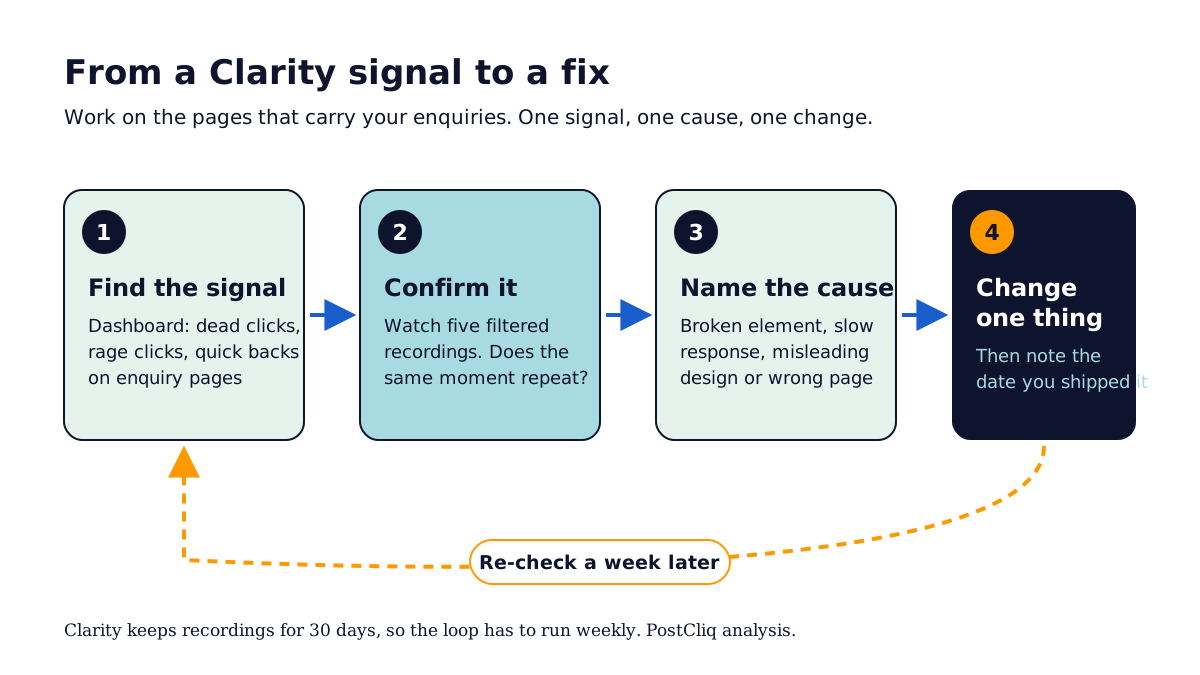
Say your contact page gets 1,200 sessions a month and 3% of them send an enquiry: 36 enquiries. Clarity shows that 10% of sessions on the page (120) include a rage click on the Submit button. Five recordings show the same thing: the button gives no feedback for several seconds, so people click again, and some leave.
Not every rage-clicker was trying to enquire. Suppose half were (60 people), and a loading state plus a clear success message lets a third of them finish (20 people). That is 56 enquiries instead of 36, and the page's enquiry rate moves from 3% to about 4.7% (56 divided by 1,200).
That is a scenario, not a forecast. The point is the method: a Clarity signal gives you a count, recordings give you a cause, and the count tells you whether the fix is worth doing this week. For context on how often forms fail generally, Zuko's form analytics benchmark found that 34% of people who start a form do not complete it (a vendor study, sample not disclosed), and Ruler Analytics puts the average conversion rate across 13 industries at 5.13% in 2026.
What can't Microsoft Clarity tell you?
Clarity cannot tell you which problem to fix first, why a visitor did not come in the first place, or whether a page's message matches the ad that sent them. It shows behaviour on pages people reached. It does not read your pages the way a buyer does, or check your forms, speed, trust signals and search access.
That is the gap we built PostCliq for. PostCliq is a free website audit from WP Creative, an Australian website growth agency. It reads up to 50 of your public pages the way a careful visitor would, across speed and page experience, forms and calls to action, content clarity, search access, accessibility, trust signals and AI readiness, then gives you a private report with evidence and three quick wins to make first. It never logs in, submits a form or changes your site.
How PostCliq uses Clarity. The Clarity connection is read-only. Once it is connected, PostCliq sets Clarity's page-level signals (dead clicks, rage clicks, quick backs, excessive scrolling) beside its own findings for the same page. A contact page with a high rage-click count and a form with no visible error message then reads as one problem with one fix, instead of two tools and an afternoon of recordings. We keep signals separate from observed issues, because a rage click is a hypothesis until someone confirms it on the page. More on the connection on the Microsoft Clarity integration page.
What to do next
- Install Clarity on your main website today, using the WordPress plugin or Google Tag Manager, and check it records.
- Connect GA4 from Clarity's Setup page, and confirm the "Clarity Playback URL" dimension appears in GA4.
- Name Clarity in your privacy policy, keep strict masking, and add a consent signal if you market to Europe or the UK.
- Open the scroll map of your contact page on mobile and write down the share of visitors who reach the form.
- Every Monday, watch five filtered recordings of rage clicks or dead clicks on your enquiry pages, and star the ones that show a repeatable problem.
- Get the public half of the picture. Run a free PostCliq audit to find what stops visitors becoming enquiries on your pages, then use Clarity to confirm the findings with real sessions. The one-hour website check is a good manual companion.
More on analytics and measurement in the measurement topic hub.
Frequently asked questions
Is Microsoft Clarity free?
Yes. Microsoft's pricing page says Clarity is free forever, with no traffic limits and no paid version. There is no trial and no card. The practical limits are technical: recordings are kept for 30 days (starred recordings for up to nine months), and Clarity records up to 100,000 sessions per project per day. Microsoft says it offers Clarity free because the anonymous behaviour data helps improve its machine learning models.
Does Microsoft Clarity slow down a website?
Microsoft says no: the Clarity script loads asynchronously, and it states there is no perceivable impact on visitors. That is the vendor's own claim, so test it on your site. Run Lighthouse or PageSpeed Insights on a key page before and after installing, and compare the results. If you already run many third-party scripts, audit those at the same time, because the combined load is what visitors feel.
Is Microsoft Clarity better than Google Analytics?
They answer different questions, so you want both. Google Analytics 4 measures traffic, sources, key events and conversions across the whole site. Clarity shows what visitors did on a page through recordings, heatmaps and frustration signals. Connect them, so a GA4 session links to its Clarity recording. Neither tells you what to fix first; that still needs judgement or a diagnostic tool.
Does Microsoft Clarity need a cookie banner in Australia?
Microsoft only enforces a consent signal for visitors in the EEA, the UK and Switzerland. Australian law does not require a cookie banner as such, but businesses covered by the Privacy Act must be open about the personal information they collect, and Microsoft's FAQ says site owners must tell users about Clarity's cookies. Name Clarity in your privacy policy and take legal advice if you are unsure.
How long does Microsoft Clarity keep recordings?
Clarity keeps recordings for 30 days from the time they are recorded. Recordings you mark as favourites, plus a random sample, are kept for up to nine months. You cannot download or delete individual recordings. If you need evidence from a campaign, star the relevant sessions while they are still available, and write down the finding with the session link.
Can Clarity see what people type into forms?
No. Microsoft says content typed into input boxes is masked in every masking mode and cannot be unmasked. By default Clarity also masks other sensitive content on the page. You can adjust masking for text elsewhere, but not for form inputs. Remember that CSS is not masked, so do not put sensitive content in style sheets.
What is a quick back in Microsoft Clarity?
A quick back is when a visitor clicks away from a page and returns in less time than Clarity expects them to spend on the page they went to. It usually means the destination was not what they expected. On a landing page, frequent quick backs suggest the page does not match the ad or search result that sent people there.
Turn more visits
into customers.
Test your key buying journey. See where customers and AI agents get stuck, and what to fix first.
Free. No credit card.