 It's free, continue with Google
CRO audit: how to run a conversion audit in an hour
A CRO audit reviews the pages, forms, proof and tracking between a visitor arriving and an enquiry arriving. Here is a six-block checklist that does it in an hour, with evidence.
 By
By The short answer
A CRO audit starts from one fact: most websites fail basics that cost enquiries. Only 48% of websites pass all Core Web Vitals on mobile, according to the HTTP Archive Web Almanac 2025, and 51% of the top one million home pages have form inputs without labels in WebAIM's automated 2026 scan. The hour below finds those problems on your own site, in order of what they are likely to cost you.
What is a CRO audit?
A CRO audit is a review of every step between a visitor landing on your site and that visitor becoming an enquiry, a lead or a sale. It looks for friction, missing proof, broken tracking and unclear messages, then ranks the fixes by effort and likely impact. It is diagnosis, not testing or redesign.
A conversion audit, also called a CRO audit, is a wide-ranging examination of the customer's journey on your website.
The definition matters because the word "audit" gets stretched. Some agencies call a heatmap review an audit. Some call a redesign proposal an audit. A real CRO audit produces findings with evidence (a screenshot, a load time, a broken link, a form that did not arrive) and a ranked list of what to fix. If it does not tell you what to do first, it is a report, not an audit.
Two things a CRO audit is not:
- It is not an A/B test. Testing tells you which of two versions wins. The audit tells you what is worth testing, or what is so plainly broken that it should simply be fixed. More on the difference in A/B testing for marketing teams.
- It is not a redesign. A rebuild is the most expensive answer to almost any conversion question. The audit is how you find out whether you need one.
How is a CRO audit different from an SEO audit?
An SEO audit asks whether search engines can find, crawl and rank your pages. A CRO audit asks whether the people who arrive are persuaded to act. They overlap on speed, accessibility and page structure, but they answer different questions and are usually owned by different people.
| Question | CRO audit | SEO audit |
|---|---|---|
| Core question | Do visitors who arrive become enquiries or sales? | Can the right people find the page in search? |
| Unit of analysis | A journey: landing page, proof, form, thank-you page | A page and a query |
| Main metrics | Conversion rate, form completion, cost per lead | Impressions, rankings, organic clicks |
| Typical findings | Unclear offer, long form, missing proof, broken tracking | Crawl errors, missing titles, thin content, weak links |
| Shared ground | ✓ speed, mobile, accessibility, clear headings | ✓ speed, mobile, accessibility, clear headings |
| Traffic source in scope | Every channel, including paid and direct | Organic search, and now AI answer engines |
| Who usually acts on it | Marketing manager, web developer, sales | SEO specialist, content team, developer |
Source: PostCliq analysis
The overlap is growing. Fewer searches now send a click at all: 68.01% of US Google searches ended with no click in January to April 2026, up from 60.45% in 2024, in SparkToro's study (the two years use different panels, which SparkToro flags). When fewer visitors arrive, the conversion side of the page carries more of the load. That argument is set out in full in what post-click optimisation means.
What does a CRO audit check? The one-hour checklist
A one-hour CRO audit covers six blocks in order: set the goal and pages, measure speed, read the message, test the form, check trust and proof, and confirm tracking. Each block has a time budget and a piece of evidence you must record. Skip the evidence and the finding will be argued away in the next meeting.
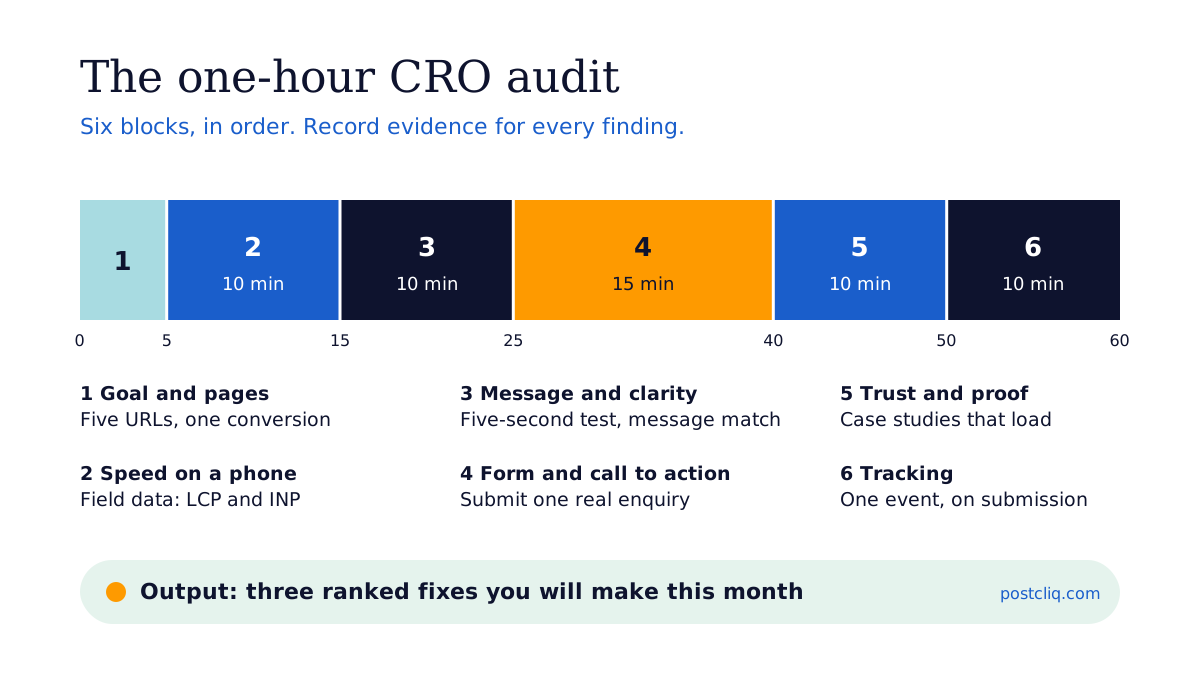
| Step | Minutes | What to check | Evidence to record |
|---|---|---|---|
| 1. Goal and pages | 5 | The one action that counts as a conversion; your five highest-traffic commercial pages | A list of five URLs and the conversion each should produce |
| 2. Speed on a phone | 10 | Largest Contentful Paint and Interaction to Next Paint on mobile, field data first | PageSpeed Insights screenshot per page; pass or fail against 2.5 s and 200 ms |
| 3. Message and clarity | 10 | Can a stranger say what you do, for whom and what to do next within five seconds? Does the page answer the ad or query that sent them? | The headline, the first call to action, and the ad or query it should match |
| 4. Form and call to action | 15 | Number of fields, labels, error messages, mobile keyboard, confirmation page, and whether the enquiry actually arrives | Field count, one test submission from an outside email, time it arrived |
| 5. Trust and proof | 10 | Named clients, case studies that load, reviews, real people, contact details, security signals near the form | List of proof on each page and any broken proof links |
| 6. Tracking | 10 | The conversion event fires once, on submission, and reaches analytics and the ad platforms | GA4 real-time report or tag assistant screenshot after your test submission |
Source: PostCliq analysis
Step 1: set the goal and pick five pages (5 minutes)
Write down the single action that counts. For a B2B service site it is usually an enquiry form or a booked call. For a store it is an order. Then pick the five commercial pages with the most sessions in the last 90 days. Five pages is enough. On most sites they carry the majority of commercial traffic.
Step 2: measure speed on a phone (10 minutes)
Run each page through PageSpeed Insights and read the field data (real Chrome users) before the lab score. Mobile matters most. In Unbounce's landing page data, mobile drove 83% of visits, and desktop converted 8% better. Most of your visitors arrive on the device that converts worse.
Speed has a measured link to conversion. A Deloitte study commissioned by Google found that a 0.1-second improvement in mobile site speed lifted retail conversions by 8.4% and travel conversions by 10.1%. That study is from 2020 and correlational, so treat it as direction, not a forecast for your site.
Step 3: read the message like a stranger (10 minutes)
Open each page on a phone, read the first screen for five seconds, look away and say what the company does, who it is for and what you should do next. If you cannot, neither can a visitor. Then check message match: the headline should answer the ad or search query that sent the visitor. The message match worksheet gives you a one-page way to record it.
Step 4: test the form yourself (15 minutes)
This is the block most audits skip, and the one that most often finds lost money. Count the fields. Check every field has a visible label. Trigger an error on purpose and see whether the message tells you how to fix it. Then submit a real enquiry from an email address outside the company and time how long it takes to reach the inbox a person actually reads.
Forms leak. Zuko's form analytics benchmark reports that 34% of people who start a form do not complete it, and that contact forms convert worse than any other form type. Zuko sells form analytics, so read it as a vendor figure. The detail is in contact form best practices, and the enquiry form review kit turns this step into a printable checklist.
Step 5: check trust and proof (10 minutes)
Look for what a sceptical buyer needs before they hand over an email address: named clients or logos, case studies that load, reviews with names, a real address and phone number, and people with faces. Click every case study link. Broken proof is worse than no proof, because the visitor went looking for it. Trust signals that make B2B buyers enquire covers which signals matter most, and in what order.
Step 6: confirm the tracking (10 minutes)
After your test submission in step 4, check that exactly one conversion appeared in GA4 and in any ad platform you use. A conversion that fires when the form comes into view, or fires twice, makes every other number in the audit wrong. The GA4 audit checklist goes deeper.
What does a worked CRO audit finding look like?
A useful finding names the page, the problem, the evidence and the likely value, using your own numbers. The arithmetic below is illustrative. It shows how to size a form finding so it can be ranked against other fixes, not what any particular site will gain.
Say a service business gets 4,000 sessions a month to its contact page, and 300 of those visitors start the enquiry form. If the site loses forms at Zuko's benchmark rate of 34%, about 102 people a month start and abandon it (300 x 0.34 = 102). The site receives about 198 enquiries.
Now suppose the audit finds that the form asks for eleven fields, three of them mandatory and irrelevant to a first conversation. Removing them will not recover all 102 abandoners. If it recovered one in ten, that is about 10 more enquiries a month (102 x 0.10 = 10.2). At a 20% close rate and an average first order of AUD 5,000, that is a scenario of roughly two extra wins and AUD 10,000 a month (10 x 0.20 x 5,000). Change any input and the number changes, which is the point: the audit ranks fixes by a range you can defend, not by a promise.
How long does a CRO audit take, and what does it cost?
A focused CRO audit of five pages takes about an hour for someone who knows the checklist. A full audit that adds analytics analysis, session recordings, user interviews and competitor review usually takes days, not hours, because each of those steps needs access, data and time to read it.
We do not quote a market price range for CRO audits here, because we could not find one with a disclosed sample. Published figures come mostly from agencies pricing their own service. What you can compare is scope.
| Depth | Typical time | Covers | Good for |
|---|---|---|---|
| Quick look (automated) | Minutes | Public pages: speed, forms, clarity, search access, accessibility, trust, AI readiness | A first triage, and checking fixes held |
| One-hour audit (this guide) | About 1 hour | Five pages, six blocks, one real test submission | A marketing manager deciding what to fix this month |
| Full audit | Several days | Adds analytics, recordings, heatmaps, interviews, competitor review | A rebuild decision, or a site with enough traffic to test |
Source: PostCliq analysis. Times are working estimates, not a measured average.
If your site has low traffic, the one-hour audit is usually enough. Testing needs volume. Optimizely's analysis of more than 127,000 experiments found that only 12% produced a statistically significant win on the primary metric. Most sites should fix the obvious before they test the subtle.
Which tools does a CRO audit need?
You can run the one-hour audit with free tools: PageSpeed Insights for speed, your own phone and email for the form test, GA4 for tracking, and Microsoft Clarity for recordings and rage clicks. Paid tools add scale and testing, but none of them tells you which fix to make first.
The tool question is covered in full in the best CRO tools in 2026, and which question each one answers. The short version: a heatmap tells you where people click, analytics tells you where they leave, and neither tells you why the enquiry never reached your inbox. If you use Clarity, the Microsoft Clarity guide shows which signals relate to enquiries.
How does PostCliq automate the public half of a CRO audit?
PostCliq runs the public half of the checklist automatically. It reads up to 50 public pages the way a careful visitor would, across seven categories, and returns a private report with evidence and three quick wins. It never logs in, submits forms or changes your site, so the private half still needs you.
| Audit block | PostCliq today | Still needs a person |
|---|---|---|
| Speed on a phone | ✓ Lighthouse lab data and Chrome UX Report field data | Deciding which fix is worth the developer time |
| Message and clarity | ◐ content clarity checks; comparing the ad with the page stays with you | Judging whether the offer itself is right |
| Form and call to action | ◐ reads forms and calls to action on the page | Submitting a real enquiry and confirming it arrives |
| Trust and proof | ✓ trust signal checks, including broken links | Knowing which clients you are allowed to name |
| Search access and AI readiness | ✓ robots, sitemap, indexing and AI readiness checks | Content strategy |
| Accessibility | ✓ automated accessibility checks | Manual testing with assistive technology |
| Tracking and analytics | ◐ Google Analytics 4, Search Console and Microsoft Clarity connect read-only | Configuring the events |
Source: PostCliq product scope, September 2026
Two limits worth stating plainly. PostCliq does not submit your form, so it cannot prove an enquiry arrives; step 4 stays manual. And its money figures are estimated opportunity ranges from sourced traffic data or your own numbers, never a claim about revenue you have lost. The CRO audit page explains the scope in more detail.
What should a CRO audit report include?
A CRO audit report should fit on one page: the conversion goal, the five pages reviewed, each finding with its evidence, a rough value range, the effort to fix, and the three fixes to make first. Anything longer tends to get filed rather than acted on.
Rank findings with two questions: how many visitors does this touch, and how hard is it to fix? A broken form on the contact page touches every enquiry and takes an hour. A new brand story touches everyone and takes a quarter. Do the first one this week. The ranking method, and a table of common fixes by effort and impact, is in how to increase your website conversion rate.
Then compare your rate against a sensible benchmark, carefully. Ruler Analytics' 2026 benchmark puts the average conversion rate at 5.13% across 13 industries, where a conversion is a qualified lead or sale, but that is one vendor's customer base. What is a good conversion rate explains why benchmarks rarely compare like with like.
Why do CRO audits fail to change anything?
CRO audits fail when they list problems without owners, rank everything as high priority, or recommend a redesign instead of a fix. They also fail when nobody re-checks a month later, so fixes quietly break again after the next plugin update or site change.
The commonest failure we see is an audit that diagnoses a campaign problem as a website problem, or the reverse. If visitors arrive from the wrong audience, no page fixes that. Why clicks don't become enquiries walks through how to tell the two apart. The second commonest is no re-check: a form fixed in March breaks in June and nobody notices until the leads stop.
What to do next
- Pick your five highest-traffic commercial pages and write down the one conversion each should produce.
- Work through the six blocks above with the one-hour website check open beside you, and record evidence for every finding.
- Submit a real enquiry from an outside email address today, and confirm it arrives and is tracked once.
- Rank the findings by reach and effort, then write the top three as fixes using the website fix brief template.
- Run a free PostCliq audit to cover the public half across up to 50 pages, and let the weekly re-audit check the fixes held.
For the wider picture of conversion work, browse the conversion rate optimisation articles.
Frequently asked questions
What is a website CRO audit?
A website CRO audit is a review of the pages, forms, proof and tracking that sit between a visitor arriving and that visitor enquiring or buying. It finds friction, missing proof and broken tracking, records evidence for each problem, and ranks the fixes by likely value and effort. It is a diagnosis that tells you what to fix first, not a redesign or an A/B test.
What is the difference between CRO and SEO?
SEO (search engine optimisation) is about getting the right people to find your pages in search and AI answers. CRO (conversion rate optimisation) is about persuading the people who arrive to act. They share ground on speed, mobile experience, accessibility and clear structure. SEO grows the number of visits; CRO grows the value of each visit. Most sites need both, owned by people who talk to each other.
How often should you run a CRO audit?
Run a full CRO audit once or twice a year, or before any rebuild or major campaign. Re-check the basics much more often: forms, tracking and speed can break after any plugin update, theme change or new tag. A weekly automated check on the public pages, plus a monthly real test submission, catches most regressions before they cost a month of enquiries.
Can you do a CRO audit for free?
Yes. The one-hour audit in this guide uses only free tools: PageSpeed Insights, Google Analytics 4, Microsoft Clarity, your phone and your own email address. PostCliq also offers a free audit of the public half across up to 50 pages, with no card required. What you pay for with a paid audit is depth: interviews, research and analysis time from a specialist.
What is an ecommerce CRO audit?
An ecommerce CRO audit applies the same method to a store, with more weight on product pages, cart and checkout. Baymard's research is the best starting point: the average documented cart abandonment rate is 70.22%, and extra costs are the top avoidable reason. PostCliq recognises ecommerce sites but does not model carts or checkout, so that part needs a manual walk-through.
Should a CRO audit come before A/B testing?
Yes, in almost every case. An audit finds the problems that are plainly broken and should simply be fixed, and it gives you evidence-based ideas for what to test. Testing without an audit wastes traffic on guesses. Low-traffic sites may never reach significance on a test at all, so for them the audit and direct fixes are the whole programme.
Turn more visits
into customers.
Test your key buying journey. See where customers and AI agents get stuck, and what to fix first.
Free. No credit card.